15 Şubat 2024 Perşembe

PLSQL Birden Fazla Satiri Birlestir Tek Satir Olarak Geriye Donduren Fonksiyon

 CREATE OR REPLACE FUNCTION GET_SAS_MLZ_SUPPLIER(Contract_ IN VARCHAR2, Part_No_ IN VARCHAR2)

RETURN VARCHAR2

AS

  TYPE name_table IS TABLE OF VARCHAR2(1000);

  names name_table := name_table();

  result VARCHAR2(4000);

BEGIN

  -- Firma adlarını doldur

  FOR rec IN (select m.vendor_no,supplier_api.Get_Vendor_Name(m.vendor_no)VendorName

           from PURCHASE_PART_SUPPLIER m

                where m.contract=Contract_ and m.part_no=Part_No_) LOOP

    names.extend;

    names(names.count) := rec.vendor_no || ' ' || rec.vendorname;

  END LOOP;


  -- Adları birleştir

  FOR i IN 1..names.count LOOP

    result := result || names(i) || ', ';

  END LOOP;


  -- Son virgülü kaldır

  result := RTRIM(result, ', ');


  RETURN result;

END;

Share:

8 Ocak 2024 Pazartesi

GPO ile Windows AD Konfigrasyonu - Configure Windows AD GPO


a) Enable audit logon events on AD computer

  1. Log on to Windows AD DC as a member of the Administrators group.
  2. Open Administrative Tools, and then click Group Policy Management.
  3. In the console tree, open Forest: YOUR_FOREST > Domains > YOUR_DOMAIN_NAME, right-click on Default Domain Policy, and then click Edit.
    [ Note: You can also edit other group policy as needed. ]
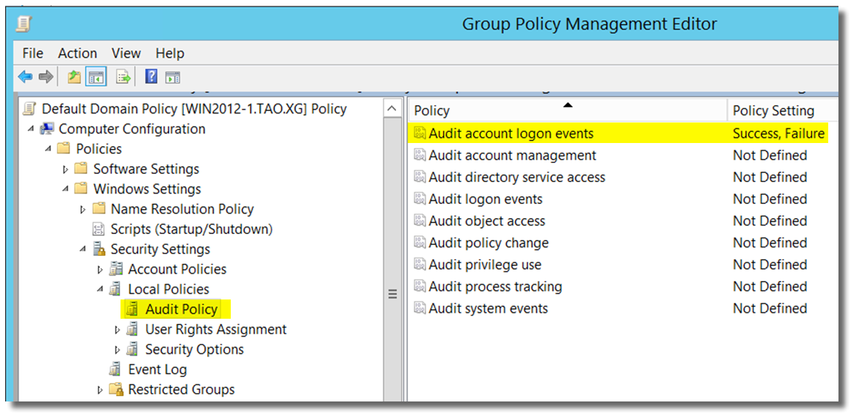
  4. In Group Policy Management Editor, open Computer Configuration > Policies > Windows Settings > Security Settings > Local Policies > Audit Policies.
  5. Double-click on Audit account logon events, and enable "Define these policy settings: Success and Failure"


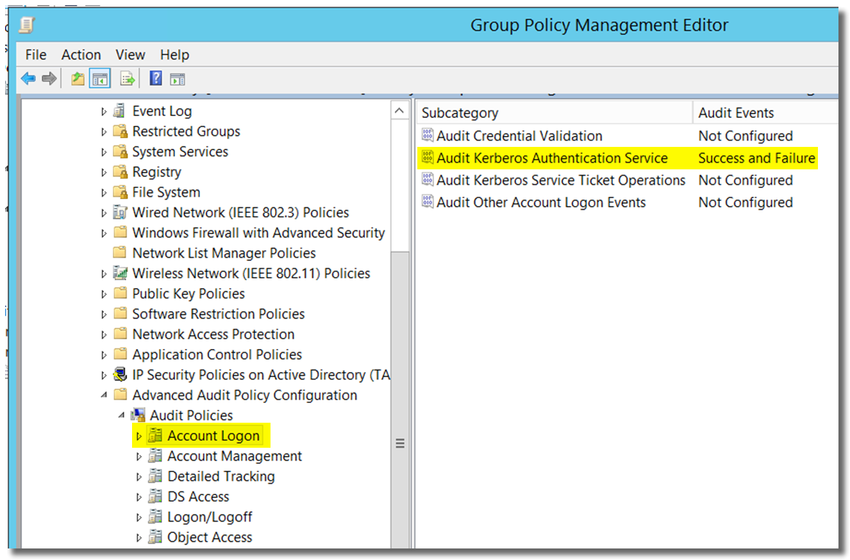
6. Open Computer Configuration > Policies > Windows Settings > Security Settings > Advanced audit policy configuration > Audit Policies > Account Logon

 7. Double-click on Audit Kerberos Authentication Service, and enable "Configure the following audit events: Success and Failure"


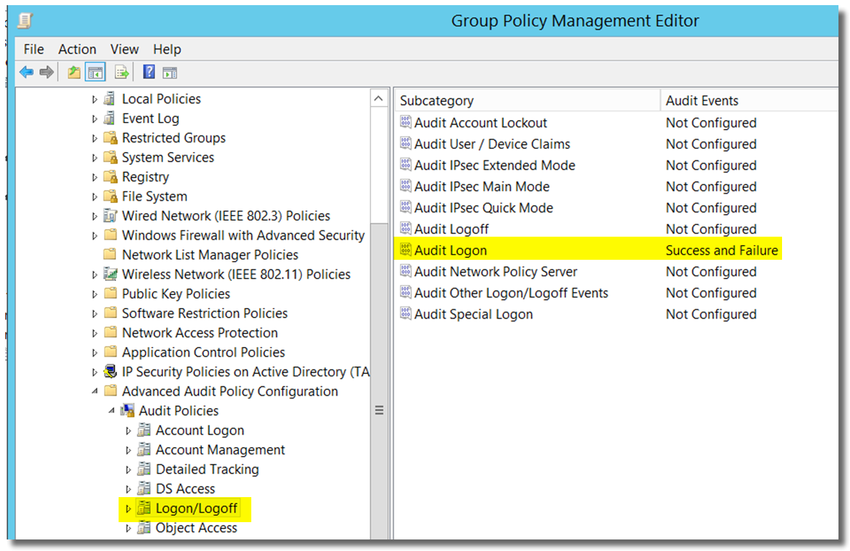
8. open Computer Configuration > Policies > Windows Settings > Security Settings > Advanced audit policy configuration > Audit Policies > Logon/Logof

9. Double-click on Audit Logon, and enable "Configure the following audit events: Success and Failure."

Source : Sophos Firewall: Best practice for STAS - Recommended Reads - Sophos Firewall - Sophos Community


Share:

6 Kasım 2023 Pazartesi

IFS Döviz Değerleme Bakiye İçin Çalışsın

 --Döviz değerleme yalnızca bakiye için çalışsın isteniyorsa 

--Onaylı fiş satırları tablosunda aşağıdaki sorgudan dönen voucher_no lar için 

-- voucher_row_tab tablosundaki party_type='CUSTOMER' alanı customer olarak güncellenecek

SELECT * FROM IFSAPP.Trype_All_Voucher_Qry a

where a.party_type IS NULL

 and a.accounting_year='2023' 

 and a.account='121.03'


 select r.company,r.voucher_no from voucher_row_tab r

 where r.party_type!='CUSTOMER'


 update voucher_row_tab 

 set party_type='CUSTOMER'

 where r.voucher_no IN ( SELECT a.voucher_no FROM IFSAPP.Trype_All_Voucher_Qry a

where a.party_type IS NULL

and a.accounting_year='2023' 

and a.account='121.03' )


Share:

12 Ekim 2023 Perşembe

Delphi Button Onclik Event

  Action := TBasicAction.Create(Self);


  { Set the OnExecute event handler. }

  Action.OnExecute := BtnRafSorgula.OnClick;


veya ;

Button1.OnClick(self);

Share:

9 Haziran 2023 Cuma

IFS ERP Uninstall

 Two ways for uninstall IFS ERP


This will clear the .NET DLL cache on the offending computer. 

In order to do that
1. Log in to the offending machine.
2. Close all the opened click once applications (IFS) on that machine.
3. Open a command prompt
4. Run the command: rundll32 dfshim CleanOnlineAppCache
5. Wait few minutes. (Even though the command returns within a second, it is running in the background)


Or the way I normally do it 

1.  Log out of IFS

2. Delete the 2.0 folder in the following location on the offending PC C:\Users\USERNAME\AppData\Local\Apps


Share:

4 Mayıs 2023 Perşembe

IFS Database Automatic Shudown With Batch File

 Stopstart.bat :

set oracle_sid=prod

sqlplus sys/Password as sysdba @C:\stopp.sql


stopp.sql:

shutdown immediate

startup

Share:

8 Haziran 2022 Çarşamba

IFS İş Emri Kapatma / IFS Shop Order Close Code

 DECLARE
   attr_ VARCHAR2(32000);
   dummy varchar2(2000);
   dummy2 varchar2(2000);
   a_ VARCHAR2(32000) := ''; --p0
   b_ VARCHAR2(32000) := 'AAASX0AAFAABDyXAAE'; --p1
   c_ VARCHAR2(32000) := '20190905140741'; --p2
   d_ VARCHAR2(32000) := 'CLOSE_TOLERANCE'||chr(31)||'0'||chr(30)||'CLOSE_OPER'||chr(31)||'Evet'||chr(30)||'CLOSE_CODE'||chr(31)||'Manual Kapat'||chr(30)||'SIMPLIFIED_MATERIAL'||chr(31)||'Hayır'||chr(30)||'CLOSED_BY_SERVER'||chr(31)||'TRUE'||chr(30); --p3
BEGIN

 FOR rec_ IN 
  ( SELECT a.objid,a.objversion,a.contract,a.order_no,a.release_no,a.sequence_no,a.qty_on_order,a.qty_released,a.qty_complete
     FROM SHOP_ORD A
      WHERE
       a.contract='XXX'
       and a.state in ('Başlatıldı','Planlandı','Yayımlandı') 
       and to_date(a.earliest_start_date,'dd.mm.yyyy')<=to_date('01.01.2022','dd.mm.yyyy')
       AND a.qty_complete=0
       --A.QTY_COMPLETE>A.REVISED_QTY_DUE*0.97 
			 --AND a.order_no='1029'
        and a.order_no||'-'||a.release_no||'-'||a.sequence_no NOT IN  
               ( SELECT s.order_no||'-'||s.release_no||'-'||s.sequence_no
                         FROM Shop_Material_Assign s
                         WHERE s.qty_assigned>0) 
   )  LOOP  
     
	  BEGIN
      Client_SYS.Clear_Attr(attr_);  
      client_sys.Set_Item_Value('CLOSE_TOLERANCE','0',attr_);
      client_sys.Set_Item_Value('CLOSE_OPER','Evet',attr_);
      client_sys.Set_Item_Value('CLOSE_CODE','Manual Kapat',attr_);
      client_sys.Set_Item_Value('SIMPLIFIED_MATERIAL','Hayır',attr_);
      client_sys.Set_Item_Value('CLOSED_BY_SERVER','TRUE',attr_);
      b_:=rec_.objid;
      c_:=rec_.objversion;
          
      DBMS_OUTPUT.put_line(rec_.order_no||'-'||rec_.release_no||'-'||rec_.sequence_no); 
                    
      IFSAPP.Shop_Ord_API.Close__( a_ , b_ , c_ , attr_ , 'DO' );                
      --shop_ord_api.Close(dummy,dummy2,rec_.order_no,rec_.release_no,rec_.sequence_no,91,'Y');
     EXCEPTION
      WHEN OTHERS THEN NULL;
       DBMS_OUTPUT.put_line('Alınan Hata:' || sqlerrm);  
     END;
          
  END LOOP;
  
  
END;


Share:

Blog Arşivi